
Creating a month of social media content in one day can make content marketing more manageable for busy founders, experts and businesses. Instead of planning, filming, and publishing each post separately, businesses can organise their ideas in advance, record multiple topics in one session, and repurpose the footage into different content formats.
The key is to approach content creation as a planned production process rather than a daily task. With the right preparation, a single recording session can provide the foundation for weeks of social media posts, including short-form videos, educational clips, graphics and written content.
At NextMedia London, we help businesses turn their knowledge, experience and ideas into professional content that can be used across their marketing channels. In this guide, we explain how to organise a monthly content shoot, make better use of recorded footage and build a repeatable system for consistent social media publishing.
The One-Day Social Media Content Production Process
A successful content production day begins before anyone steps in front of a camera. The topics, intended audience, recording schedule, and expected deliverables should already be agreed upon.
We recommend dividing the process into four stages.
Plan the content
Start by identifying the questions your audience asks, the problems your business solves, and the subjects you want to be known for. Group related ideas into themes, then decide which formats will communicate them most effectively.
For example, a business consultant might prepare content around business growth, common mistakes, practical advice, and client questions. Each theme can provide several distinct topics for the recording session.
Prepare the recording session
Create a list of talking points, interview questions, demonstrations, or video scripts. You do not necessarily need to memorise every word. A clear outline can help speakers communicate naturally while ensuring that the essential points are covered.
Prepare the equipment, recording space, clothing, props and any supporting materials before filming begins.
Record multiple topics together
Once the setup is ready, record related videos in batches. This reduces the time spent repeatedly adjusting equipment, preparing the environment and getting comfortable on camera.
A founder could record several educational videos, answer frequently asked customer questions and take part in a longer interview during the same session.
Edit, organise and schedule
After filming, review the footage, select useful sections and edit each asset for its intended purpose. Add subtitles, graphics or supporting copy where needed, then organise the approved content into a monthly publishing calendar.
One important distinction is that a month of content can be captured in one day, but the complete process may take longer. Editing, graphic design, approvals, and scheduling can happen after the recording session.
Common Challenges in Consistent Social Media Content Creation
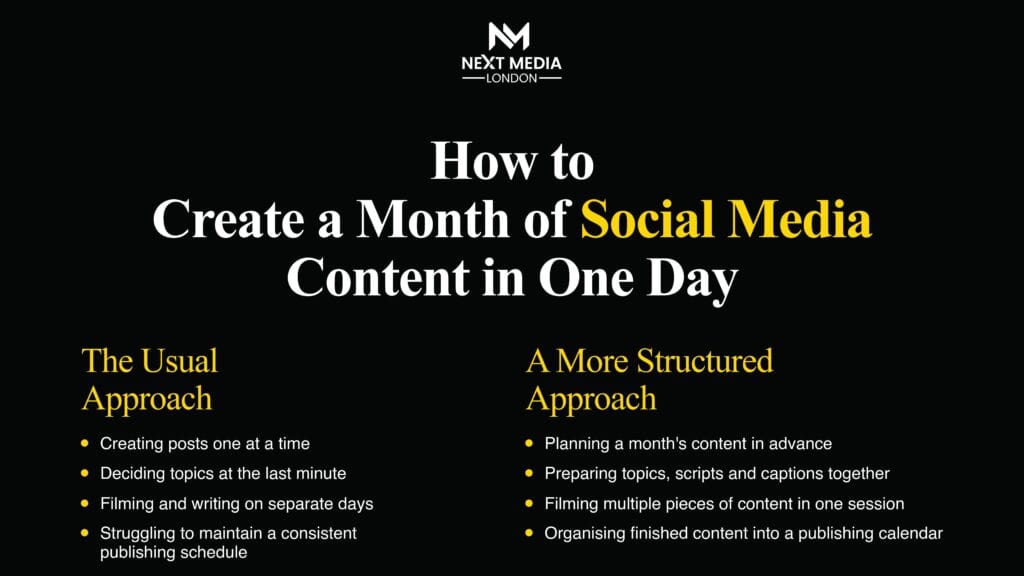
Many businesses understand the importance of social media but struggle to maintain a consistent publishing schedule. The problem is often the amount of work involved in creating every post from scratch.
Common challenges include:
- Running out of ideas: finding fresh, relevant topics every day can become difficult.
- Limited time: content creation competes with meetings, client work, and business operations.
- Camera confidence: founders and experts may know their subject well but feel uncomfortable recording themselves.
- Repeated setup work: recording individual videos throughout the week creates unnecessary preparation.
- Unusable footage: recordings without a clear structure can be difficult to edit into effective standalone content.
- Inconsistent publishing: content gets delayed when there is no prepared calendar or organised workflow.
Batch production helps address these challenges by bringing several activities together into one planned process.
For instance, a consultant could record answers to ten common client questions during one session rather than arranging ten separate filming sessions. Those recordings could then become individual educational videos, with selected insights adapted into written posts or carousels.
The objective is not simply to publish more often. It is to make content production easier to manage while keeping the material useful, relevant and consistent with the brand.
Social Media Content Output from a Single Recording Session
The number of assets produced during a recording session depends on preparation, recording time, topic complexity and editing requirements. At NextMedia London, we recommend deciding on the intended deliverables before filming so that the session has a clear purpose.
Consider an illustrative three-hour recording session for a founder who has prepared several talking points and interview questions.
| Content format | Illustrative quantity |
| Main educational videos or interviews | 2 |
| Short-form video clips | 12 |
| Quote graphics | 4 |
| Educational carousel posts | 4 |
| Supporting text posts | 4 |
| Total potential assets | 26 |
This is an example of a possible content plan, not a guaranteed output or standard package. The actual number of finished assets depends on the material recorded, the length and quality of each recording, the complexity of the edits and any additional copywriting or design work.
The same recording can also support several formats without every asset repeating the same message.
For example, a founder explaining a common industry problem could provide the material for:
- A short video explaining the problem.
- A second clip outlining a practical solution.
- A carousel breaking the solution into steps.
- A written post highlighting the main lesson.
- A quote graphic featuring a useful takeaway.
Each asset should offer a clear reason to exist. Repurposing works best when the original material contains several useful insights that can be presented independently.
The Role of Professional Video Production in Content Creation
Professional video production can help businesses maintain consistent audio, lighting, framing, and presentation across their social media content.
Smartphones can be suitable for informal updates and quick behind-the-scenes posts. However, businesses producing founder interviews, educational video series, branded content, or professional podcasts may benefit from a controlled recording environment and dedicated production support.
Recording quality matters because every asset depends on the original footage. Unclear speech, distracting background noise, inconsistent lighting, and poor framing can make otherwise valuable information harder to use.
A planned recording setup allows speakers to focus on communicating their expertise rather than repeatedly adjusting equipment. It also creates a more consistent foundation for editing videos into different formats.
At NextMedia London, our professional video production services support businesses that need planned filming and professionally produced video assets for social media and wider marketing activity.
Our focus is not on making every post look unnecessarily cinematic. It is on capturing clear, professional footage that suits the brand, communicates the message, and can be adapted to the intended platform.
Turning Podcast Recordings into Social Media Content
Podcasts can provide valuable material for a monthly social media content plan. A single conversation may include practical advice, personal experiences, industry opinions, customer questions, and examples that can be developed into separate pieces of content.
However, simply cutting a long episode into random sections does not guarantee useful social media clips. Each selected section should communicate a complete idea and make sense to someone who has not watched the full conversation.
A structured podcast repurposing workflow includes:
- Record a focused conversation: use a clear subject and prepared questions to guide the discussion.
- Identify valuable moments: look for useful explanations, strong opinions, practical examples and memorable insights.
- Extract standalone clips: choose sections that communicate one clear message without requiring the full episode for context.
- Edit for the intended platform: adapt the framing, pacing, subtitles and presentation to the content format.
- Create supporting assets: use selected insights to develop carousels, quote graphics and written posts.
- Organise the finished content: label each asset by topic and assign it a place in the publishing calendar.
For example, a 30-minute interview about business growth might include separate discussions about customer acquisition, hiring decisions and strategic mistakes. Each discussion could become a standalone video addressing a different audience need.
Businesses looking to record professional interviews or conversations can explore podcast studio hire at NextMedia London. A professionally managed recording environment can help establish a consistent foundation for podcast episodes and the social content developed from them.
The best results come when repurposing is considered before recording begins. A conversation planned around several useful questions is more likely to produce a range of meaningful content than an unstructured recording.
Organising and Scheduling Your Monthly Content Calendar
Once the footage has been edited, every finished asset needs a clear place in the monthly publishing calendar.
A content calendar helps you understand what will be published, where it will appear and which business objective it supports. It also reduces the risk of posting several similar videos together and leaving gaps elsewhere in the month.
For each asset, record:
- Topic and key message.
- Content format.
- Intended platform.
- Publication date.
- Caption and call to action.
- Approval status.
- Relevant campaign or business objective.
Suppose a business has 20 approved assets ready for publication. These can be distributed across four weeks, mixing educational videos, practical tips, carousels, and occasional promotional posts.
Avoid publishing every clip from the same recording consecutively. Spread related topics across the calendar and introduce variety so that the audience receives a useful mix of content.
Before scheduling, check that each asset has a clear opening, a complete message, accurate captions, appropriate branding and a relevant call to action. Links and subtitles should also be checked before publication.
Scheduling tools can automate the publishing process, but they do not replace editorial judgement. Leave room for timely industry developments, audience questions and changes in business priorities.
Measuring the Results of Monthly Content Production
At NextMedia London, we believe the value of a content production session should be assessed by more than the number of videos recorded. The finished content needs to support your marketing objectives and reach the people you want to engage.
Four areas can help you evaluate the effectiveness of your monthly content production.
Content Output and Usage
Track the number of finished assets delivered and how many are actually published. This helps identify whether the original content plan is realistic and whether the business is making good use of the material produced.
If a large proportion of assets remains unused, review the calendar, approval process and content formats before increasing production volume.
Production Efficiency
Compare the time spent planning, recording and editing with the number of usable assets delivered. A well-organised workflow should reduce repeated setup work and make production easier to manage.
Over time, this information can help you refine recording schedules and set more realistic expectations for future sessions.
Audience Engagement
Review relevant metrics such as reach, watch time, comments, shares and profile visits. These figures can help identify which topics and formats attract attention or encourage meaningful interaction.
Avoid judging the entire strategy on one post. Look for patterns across several weeks and use those findings to inform future content decisions.
Business Enquiries
Monitor website visits, enquiries and qualified leads that can reasonably be attributed to social media activity. Depending on your objectives, you may also track booking requests, consultation enquiries or visits to specific service pages.
This gives you a broader view of content performance beyond views and likes.
If you are considering professional support for your next content shoot, visit the NextMedia London pricing page to explore production options and assess which level of support fits your requirements.
Common Mistakes in One-Day Content Production
A one-day recording session can make content creation more efficient, but poor preparation can limit its value. The main priority should be producing useful, publishable content rather than chasing the highest possible asset count.
Avoid these common mistakes:
- Recording without a content plan: prepare topics, questions and intended deliverables before the session.
- Covering too many unrelated subjects: prioritise themes that matter to your target audience.
- Expecting every clip to work independently: make sure each edited video communicates a complete idea.
- Overlooking audio quality: unclear speech can reduce the usefulness of interviews and educational videos.
- Using identical content across every platform: adapt the format and presentation to the intended audience.
- Skipping quality checks: review facts, subtitles, branding, captions and calls to action before delivery.
- Ignoring the editing workload: agree on realistic deliverables and turnaround times in advance.
- Stopping at publication: review performance and use the findings to improve the next production cycle.
A structured workflow makes the process more predictable while leaving enough flexibility to respond to audience needs and changing business priorities.
Building a Repeatable Monthly Content Production System
The real value of one-day content production comes from repeating and improving the process each month.
Start by reviewing the previous month’s results. Identify which topics attracted attention, which videos generated useful conversations and which posts contributed to business enquiries.
Use those findings to prepare the next content brief. Select the topics, agree on the recording requirements, organise the session, edit the footage and schedule the approved assets.
The process should also include clear responsibilities. Someone needs to oversee the content plan, someone must approve the material, and the finished assets need to be published and measured. These responsibilities can sit within the business or be shared with an external production partner.
At NextMedia London, our social media content creation service supports planned production, from filming and editing to delivering social-ready assets. Businesses can use professional production support alongside their existing marketing or social media management team.
The aim is to establish a sustainable system rather than treating every month as a fresh content challenge. Each production cycle should benefit from the lessons learned during the previous one.
A Seven-Step Framework for One-Day Content Production
Use this practical framework to prepare your next monthly content shoot.
- Set the objective: decide which audience you want to reach and what the content should help achieve.
- Research audience questions: identify recurring problems, useful topics and areas where your business has genuine expertise.
- Prepare the content brief: organise talking points, scripts, interview questions and intended formats.
- Plan the recording session: confirm the schedule, recording setup, people involved and expected deliverables.
- Capture the footage: record related topics efficiently while allowing enough time for clear, natural delivery.
- Repurpose and schedule: edit the material into suitable assets, check quality and assign publication dates.
- Measure and improve: review performance, identify useful insights and apply them to the following month’s plan.
Before filming, confirm that every topic has a purpose and that the proposed output is realistic. After filming, ensure that each asset is suitable for its intended platform and that the team has a clear process for reviewing results.
Frequently Asked Questions
Can a business prepare a month’s social media content in one day?
Yes. A well-planned recording session can capture enough material to support several weeks of publishing. The final output depends on preparation, recording time, editing requirements, and the complexity of the content. Editing, design and approvals may continue after the recording day.
What is a realistic number of videos for one recording session?
The number depends on the length of the session, the preparation involved and the type of content being recorded. A structured session may capture several educational videos, an interview, and additional material for short-form clips. Agreeing on the deliverables beforehand helps set realistic expectations.
Which social media formats can be created from a podcast?
A podcast can provide material for short video clips, educational posts, quote graphics, carousels, and written summaries. Each asset should focus on a useful idea and be adapted to its intended platform rather than simply repeating the full episode.
What should be ready before a monthly content shoot?
Prepare your target audience, content objectives, topic list, scripts or talking points, recording schedule, and expected deliverables. Confirming these details in advance helps the session run efficiently and gives the production team a clear direction.
Is professional video production useful for business social media?
Professional production can help businesses maintain consistent audio, lighting, framing, and editing across their content. It can be particularly useful for founder interviews, educational video series, professional podcasts, and campaigns where presentation quality matters.
Where can businesses arrange professional social media content production in London?
Businesses looking for professional social media content production in London can explore NextMedia London’s social media content creation service. The service supports planned filming, editing, and delivery of social-ready content for businesses and their marketing teams.
Final Thoughts: Make Every Recording Session Count
Creating a month of social media content in one day is not about rushing through 30 posts. It is about making a planned recording session produce more useful material with less repeated effort.
For founders, experts and businesses, the opportunity lies in turning existing knowledge into professional, reusable content. With a clear plan, an organised production process and a practical publishing calendar, one recording session can provide the foundation for weeks of communication.
At NextMedia London, we believe the strongest content systems combine purposeful planning, professional recording, thoughtful editing and consistent measurement.
Plan with purpose. Record efficiently. Repurpose intelligently. Publish consistently.