
What Is the Hidden Cost of DIY Podcast Editing?
The hidden cost of DIY podcast editing isn’t the hours spent at your laptop. It’s the listeners you lose before you even notice them leaving. Inconsistent volume, uncut dead air, and unbalanced sound push new listeners away in the first few minutes, which quietly caps how fast a show can grow.
I’ve sat in on hundreds of recording sessions, and the pattern repeats itself constantly: hosts spend weeks planning a great episode, then rush the edit in one tired evening because they’re exhausted or just want it published. That rush is where the damage happens. These are the five DIY podcast editing mistakes I see most often, why each one slows growth, and how to fix them:
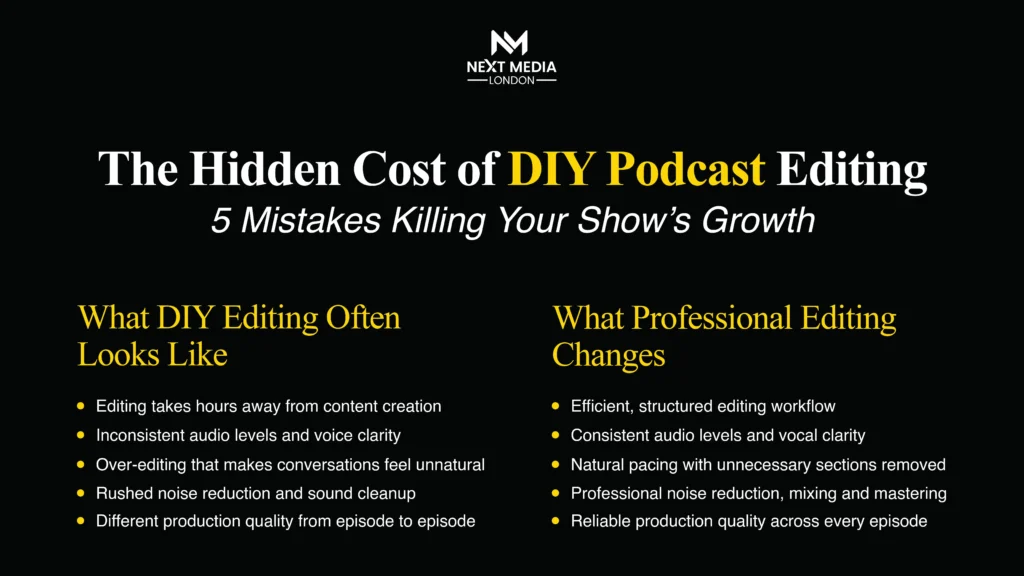
- Inconsistent audio levels and loudness
- Skipping noise reduction and EQ
- Over-editing or under-editing the pacing
- Ignoring platform loudness standards
- Burning out on DIY editing until the show goes quiet
Why Do Most Podcasts Fail to Grow?
Most podcasts fail to grow because they lose listeners faster than they gain them. Podnews’ 2025 industry analysis found that 90% of podcasts stop publishing after episode three, and the 2025 Independent Podcast Report found 72% of creators cite discoverability and audience growth as their biggest challenge. Poor audio quality, irregular publishing, and production that can’t compete with polished shows explain why podcasts fail to grow even when the underlying content is genuinely good.
Growth typically stalls for three overlapping reasons, and editing quality touches all three:
Discoverability: as above, most creators say this is their single biggest challenge. No amount of editing fixes a weak title or the wrong category, but it does shape whether a new listener sticks around long enough to hit subscribe.
Retention: a completion rate under roughly 40–50% signals that people are opening an episode and leaving before the message lands, which is often a production problem wearing a content problem’s clothes.
Consistency: “podfade,” the point where a host quietly stops publishing, is rarely one decision. It’s usually the slow result of episodes taking too long to finish because editing has become a chore instead of a step.
What Are the 5 DIY Podcast Editing Mistakes Killing Your Growth?
Each of these podcast editing mistakes looks small in isolation. Together, they compound episode after episode, and they’re the reason two shows with equally good content can grow at completely different speeds.
1. Inconsistent Audio Loudness
Inconsistent audio loudness happens when a host and guest sit at different volumes, or when loudness shifts from one episode to the next. Listeners reach for the volume dial within seconds, and most won’t bother. They’ll just leave. Consistent loudness, not maximum loudness, is what keeps people listening.
This comes down to gain staging: setting recording levels correctly before you hit record, not fixing them afterwards. A guest joining on a laptop microphone and a host on a broadcast microphone can differ by 10dB or more without levelling. I’ve had hosts re-record entire intros because enthusiasm pushed their levels into distortion, when a limiter and matched gain would have solved it in seconds during the session itself.
2. Untreated Background Noise and Weak EQ
Skipping noise reduction and EQ leaves in room echo, hiss, hums, and muddy low-end that bury speech clarity. Untreated background noise reads as amateur within the first ten seconds, often enough for a first-time listener to close the app before your intro finishes.
A noise gate removes silence-level hiss between sentences; EQ removes hums (mains hum sits around 50Hz in the UK) and cuts the boxy frequencies that make a small room sound like a small room. One true-crime host I worked with re-recorded her opening three times because a fridge hum kept creeping back into the take. A single high-pass filter would have solved it without a re-take.
3. Poor Pacing: Over-Editing or Under-Editing
Over-editing strips out every pause and filler word until speech sounds robotic; under-editing leaves in rambling tangents, long dead air, and false starts. Both extremes raise the odds a listener taps away, because natural pacing, not perfection, is what holds attention.
Riverside’s own analytics put listener drop-off in the first five minutes at up to 35%. That makes your cold open the most carefully edited part of the episode, not the most rushed. Trim the throat-clearing and the three-minute tangent about the weather; keep the natural “um” that makes a host sound human rather than synthetic.
4. Ignoring Platform Loudness Standards
Ignoring loudness standards means episodes play at different volumes across Spotify, Apple Podcasts, and YouTube, forcing listeners to reach for their volume control between shows or between your own episodes. Most platforms now auto-normalise audio on playback, and an unmastered file often sounds thin or distorted after that correction.
Most spoken-word platforms target a loudness range roughly between -16 and -19 LUFS, rather than the louder targets used for music. Mastering to a target loudness, not just “turning it up,” is what keeps an episode sounding the same on a phone speaker, in a car, and through headphones.
5. DIY Editing Burnout (The Mistake Behind the Other Four)
DIY editing burns hosts out because a single 40-minute episode can take three to six hours to clean, cut, and master. That’s time competing directly with writing, guest outreach, and promotion. Once editing eats the week, publishing slows down, and inconsistency becomes one of the fastest ways a show loses momentum.
This is usually the mistake underneath the other four. A host exhausted from editing rushes gain-staging, skips the noise pass, and publishes an under-edited episode just to hit a deadline. It’s rarely one bad decision. It’s a few hours of fatigue compounding into one weaker episode, repeated weekly until the show goes quiet.
Would rather skip the late-night edit? Book a professional podcast studio session in London and let an on-site engineer catch these mistakes during recording, not after.
How Much Time and Money Does DIY Editing Really Cost You?
These aren’t cosmetic issues. They’re podcast post-production mistakes with a measurable cost. A simple way to see it:
DIY Editing Cost = (Hours per Episode × Your Hourly Value) + Lost Growth from Inconsistent Publishing
Picture two hosts launching identical weekly 45-minute interview shows on the same day. One edits everything alone; the other uses a professional engineer for level-setting and cleanup. By week twelve, the gap compounds:
Hours spent per episode: Host A (DIY) spends around 5 hours. Host B (professional) spends about 30 minutes reviewing. Episodes published on schedule: Host A manages 8 of 12. Host B publishes all 12. Average completion rate: Host A holds around 46%. Host B holds around 78%. Average weekly downloads: Host A sits around 40. Host B is closer to 140.
If an hour of your time is worth £35, five hours of editing is £175 of opportunity cost per episode, or roughly £700 a month spent on a task that’s also capping the show’s growth rate. That’s before counting the missed episodes: a show publishing 8 of 12 scheduled episodes isn’t just a third lighter on content; it’s signalling inconsistency to platform algorithms and listeners at the same time.
What’s the Best Podcast Editing Framework for Beginners?
The best podcast editing tips for beginners follow a five-step sequence I call the CLEAR framework: Capture, Level, Eliminate, Apply structure, Review. Working through the steps in this order prevents the most common beginner error, which is trying to fix loudness and noise at the same time and usually making both worse.
Step 1: Capture Clean Audio at the Source
Set input gain before you record, not after. Aim for peaks between -12dB and -6dB, leaving headroom so nothing clips. Five minutes of gain-staging at the start saves hours of noise reduction later, and the cheapest edit is always the one you never have to make.
Step 2: Level Every Voice and Every Episode
Match the host and guest volumes to each other, then match this episode’s overall loudness to your last one. Listeners should never need to touch the volume control when your intro plays.
Step 3: Eliminate Noise and Dead Air
Apply a noise gate to strip silence-level hiss, run a light noise-reduction pass on hums and room tone, and cut long pauses, false starts, and tangents that don’t serve the story.
Step 4: Apply Consistent Structure
Use the same intro, outro, and music bed on every episode, and keep pacing similar week to week. Structure is what makes a show feel finished rather than assembled.
Step 5: Review Before You Publish
Listen back at conversational volume on a phone speaker, since that’s where most people will actually hear it, rather than on studio headphones, where flaws are exaggerated and already feel familiar.
DIY vs Professional Podcast Editing: Which Is Right for Your Show?
DIY editing suits hosts with a few hours a week to spare and a simple single-microphone format. Professional editing suits shows recording multiple speakers, publishing weekly, or treating the podcast as a business rather than a hobby. Most growing shows land somewhere between the two.
| Factor | DIY Editing | Professional Editing |
| Time per episode | 3–6 hours | 0–1 hour (review only) |
| Consistency across episodes | Variable | High |
| Equipment/software cost | £0–£300 one-off, plus learning time | Included in the session or package |
| Learning curve | Weeks to months | None |
| Best suited to | Solo hosts, low frequency, tight budget | Weekly shows, multi-guest formats, brand-led shows |
| Scalability | Breaks down as output increases | Scales with the show |
Neither option is universally right. The honest question is whether editing is the best use of your specific hours this week, or whether a producer or studio session, like the one I run at NextMedia London, would free that time for the part of the show only you can do: the conversation itself.
What Tools Do Professional Podcast Editors Actually Use?
Professional podcast editors combine a digital audio workstation for cutting and mixing with AI-assisted tools for noise reduction and loudness matching, plus a remote recording platform whenever guests join online. The tools matter less than knowing which problem each one solves.
- Digital audio workstation (DAW): multi-track cutting, mixing, and layering. Examples: Adobe Audition, Hindenburg, Audacity.
- Text-based / AI editors: cut by editing a transcript and removing filler words automatically. Example: Descript.
- AI audio cleanup: automated noise reduction and speech enhancement. Examples: Adobe Podcast Enhance, Cleanvoice, Auphonic.
- Remote multi-track recording: a separate, high-quality track for every remote guest. Examples: Riverside, Squadcast.
- Loudness metering: measuring and correcting LUFS before export. Examples: Auphonic, built-in DAW meters.
AI cleanup tools have closed a lot of the gap between DIY and professional results over the past couple of years, but they still work best as a second pass after correct gain-staging, not as a substitute for it. Software can reduce noise that’s already in a recording; it can’t add back clarity that was never captured.
How Do You Measure Podcast Editing Quality?
Podcast editing quality is measured by listener behaviour, not personal taste. The most useful signals are completion rate, download growth between episodes, and unsubscribe rate, all of which shift measurably when audio quality improves or declines.
- Completion rate: (average consumption time ÷ episode length) × 100. Shows whether the edit holds attention; 70%+ is considered good performance, with top genres like true crime and fiction reaching 85%+.
- Download velocity: downloads within 7 days of release. Signals early momentum per episode; more than 28 downloads in the first week put a show in the top half of all podcasts.
- Episode-over-episode growth: ((downloads this episode − downloads last episode) ÷ downloads last episode) × 100. Shows whether the show is compounding or stalling; look for a consistent positive trend over a rolling 90 days.
- Unsubscribe/churn rate: (unsubscribes ÷ starting subscribers) × 100. Flags whether production issues are pushing people away; should stay low and stable, not spike after specific episodes. | Turnaround time | Days from recording to publish | Whether editing load threatens consistency | Under 2–3 days for weekly shows |
Track these every episode, not every quarter. A single episode with a completion-rate drop is a data point; three in a row is a pattern worth investigating, usually starting with the audio before the content gets blamed.
When Should You Scale from DIY to a Professional Studio?
You should scale once editing starts costing more than the show can afford. This is usually signalled by hours spent editing each week, missed publishing dates, or a falling completion rate. Scaling means increasing output or quality without adding hours to the host’s week, through batch recording, a hybrid editing workflow, or outsourcing entirely.
- Editing takes 4+ hours weekly: editing now competes with growth activities, so move to a hybrid or outsourced workflow.
- Three or more missed publishing dates in a quarter: your editing load is threatening consistency; batch-record two to four episodes per session instead.
- Completion rate falling episode over episode: production quality may be slipping under time pressure; add a second-pass audio review before publishing.
- Adding a second host, co-host, or regular guest slot: multi-track complexity increases sharply, which is the point to move to professional editing or studio recording.
The advanced version of this isn’t “DIY versus professional.” It’s a hybrid: record in a treated space with a technical safety net so a bad take or a level mistake never makes it into the file, handle light editing yourself if you enjoy it, and hand off the technical cleanup that has the steepest learning curve. My studio in Bermondsey is set up exactly this way, for hosts who’ve outgrown a spare room but still want to stay hands-on.
What’s Next for Podcast Production and Editing?
The next phase of podcast editing is real-time correction during recording rather than fixing problems afterwards, alongside AI tools that handle first-pass cleanup so human attention shifts to pacing and story instead of technical repair.
- Real-time cleanup during recording: noise reduction and level-matching happening live, catching mistakes before they’re baked into the file.
- AI first-pass editing: automated cuts of filler words and dead air, with a human doing a final pacing and judgment pass rather than the whole edit.
- Video-first podcasting: as more shows publish to YouTube and video feeds, editing now covers picture as well as sound, raising the production bar again.
- Rising listener expectations: as AI cleanup becomes standard, “good enough” audio increasingly reads as a red flag rather than a neutral default.
- Adaptive loudness delivery: platforms increasingly normalise playback, shifting the editor’s job from “sounding loud” to “sounding correct at any volume.”
Where Can You Book a Professional Podcast Recording Session in London?
London podcasters can book a fully engineered studio session with a technical engineer, broadcast microphones, and 4K video included in every hire, removing the DIY editing bottleneck at the recording stage rather than fixing it afterwards.
That’s the model I built at NextMedia London: every session includes an on-site engineer handling levels and room acoustics in real time, so several of the mistakes above are caught during the recording instead of discovered in a late-night edit. Sessions start from £75 an hour, with packages available that include standard or fully-managed editing if you’d rather hand post-production over entirely.
How Do You Fix Podcast Editing Mistakes for Good?
The master framework for fixing these podcast growth mistakes maps each of the five errors to a direct action, using the CLEAR sequence: Capture, Level, Eliminate, Apply, Review.
- Inconsistent loudness → Capture + Level → even volume across hosts, guests, and episodes.
- Untreated noise → Eliminate → clean, professional-sounding audio from the first second.
- Poor pacing → Eliminate + Apply structure → tighter episodes that hold attention.
- Ignoring loudness standards → Level + Review → consistent playback across every platform.
- Editing burnout → all five steps, or outsourcing → sustainable, on-schedule publishing.
What Should You Confirm Before Publishing a Podcast Episode?
- Host and guest levels matched within 2–3dB of each other
- Loudness normalised to a consistent target across all episodes
- Noise gate and noise reduction applied to remove hiss, hum, and room tone
- Dead air, false starts, and off-topic tangents trimmed
- Filler words reduced without making speech sound unnatural
- Consistent intro, outro, and music bed in place
- Final export checked on a phone speaker, not just studio headphones
- File exported at the loudness and format each platform expects
- Episode published within your stated turnaround time
- Completion rate and download trend reviewed after publishing
Conclusion
The advantage professional editing gives a podcast isn’t better sound for its own sake. It’s compounding trust. Every consistently produced episode raises the floor for a new listener’s first impression, and podcast growth runs almost entirely on first impressions repeating inside someone’s favourite platform. A DIY show with variable quality has to win a new listener over every single episode; a consistently produced show only has to earn that trust once, because every episode after meets the same bar.
That consistency, not any single technical fix, is what compounds into subscriber growth over months rather than single episodes. If you’d rather build that consistency from the first recording than fix it afterwards, that’s exactly what a professional podcast recording session is designed to do.
Ready to stop losing listeners to bad audio? Book a professional podcast recording session at NextMedia London’s Bermondsey studio and let an engineer handle the technical side from the first take.
Frequently Asked Questions (FAQS)
How much does professional podcast editing cost in the UK?
Professional podcast editing in the UK typically costs £50 to £150 with a freelance editor, or £200 or more from a full production agency, or £75 an hour for a studio session that includes recording, engineering, and editing.
Can I edit my own podcast and still grow my audience?
Yes, but growth will be slower and more fragile. DIY editing works if you can consistently give each episode three to six hours and still publish on schedule. Most hosts can’t sustain that for long.
How long does it take to edit one podcast episode?
A 40–45-minute episode typically takes three to six hours to edit manually, or under an hour with AI-assisted tools and professional software, depending on how much cleanup the raw recording needs.
What’s the average podcast editing turnaround time?
Audio-only professional edits typically come back within 48 to 72 hours. DIY turnaround varies widely and often slips, which is one of the most common reasons publishing schedules break down.
What podcast audio mistakes are killing my show’s growth?
The most damaging issues are inconsistent loudness, untreated background noise, poor pacing, ignoring platform loudness standards, and inconsistent publishing due to editing burnout.
Is it worth hiring a podcast editing company?
It’s worth it once editing costs more in time and inconsistency than it would in fees, usually once a show publishes weekly, adds a second speaker, or starts treating growth as a real goal.